CableEye - The Future-Ready Cable Test System
Discover how to design, test & document cables, harnesses & more with CableEye continuity & HiPot test systems, and learn how to automate your tests and prepare ISO9001-quality reports. Watch these video tutorials with live examples; Each clip describes one basic function of the CableEye software. You may view the videos in any order, although you should watch them sequentially to get the greatest benefit. Note that the CableEye software is a common platform to all CableEye testers, so once you've learned to operate one model of CableEye tester, you've learned to operate them all!
Display Notes: The videos are shot using the CableEye software in Control Mode and with English selected as the screen language. This Control Mode is the view that the CableEye Test System Manager uses to access all system options and to program the tester. There is also a Production Mode that displays only a limited set of essential controls and information to the production worker and which can be activated with a single click or barcode reader. A screenshot example of this Production Mode Screen is shown below. Additionally, the CableEye Test System Manager can program the tester to display a pop-up window with detailed operator Work Instructions containing text, photos, interactive buttons, and triggers to open additional resources such as video, schematics, parts lists and BOMs. The Work Instructions Display can be programmed to fill the screen, and to let barcode readers input data and activate tests. You can choose the exact amount of detail, imagery, language and automation you need to ensure your work instructions and tests are carried out flawlessly.
Problems watching these videos in your browser? Check them out directly from our YouTube Channel
Click here to see other videos demonstrating capabilites of CableEye testers:
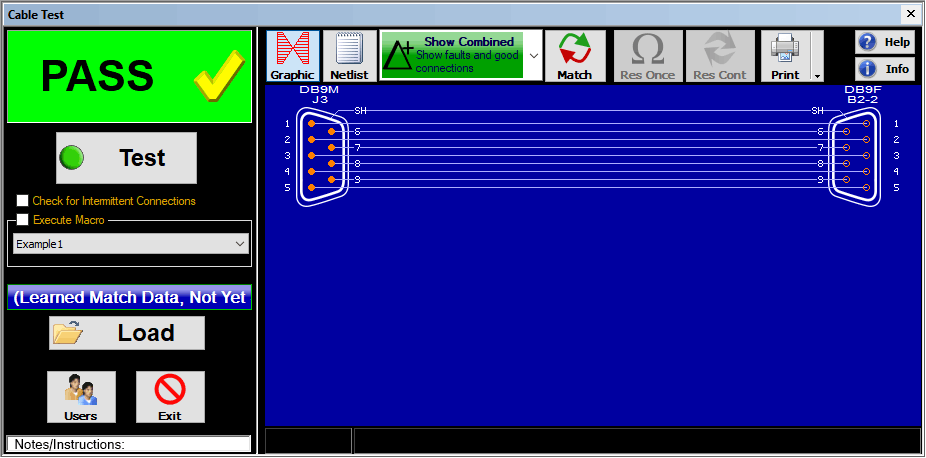

1 - Measuring a Cable
Introduction to the CableEye Software. How to manually measure a cable on any CableEye tester.Video Duration: 5:39 min

2 - Learning a Model Cable
Connect a master cable to the CableEye tester and learn it.Video Duration: 3:00 min

3 - Comparing Two Cables
Compare a loaded "master" cable with a tested one.Video Duration: 4:47 min

4 - Testing for Intermittent Connections
Flex the cable to test for intermittent shorts or opens.Video Duration: 4:55 min

5 - Saving Cable Data
Once a master cable is created, save it to the database to use it as reference later.Video Duration: 3:12 min

6 - Searching the Database
Connect a cable and test it, then check if an identical or similar cable exists on the database.Video Duration: 4:35 min

11 - Adapting to Custom Test Fixtures
Build your own custom interfaces to connect to the CableEye system.Video Duration: 3:08 min

15 - Speech Probe
Test single ended cables or identify flying wires using the provided test probe.Video Duration: 4:29 min

16 - Light Director - 1st Sided Pinning
Guided assembly for pinning connectors. Reduce miswire errors and improve pinning speed.Video Duration: 6:46 min

7 - Printing Schematics and Labels
Print your Match / Test reports and labels.Video Duration: 3:46 min

8 - Automatic Testing
Automate your test station. Learn how Macros work.Video Duration: 4:36 min

9 - Data Logging
Batch testing using macros and Log/Batch ReportsVideo Duration: 6:21 min

10 - Wirelist Editing and Cable Design
Manually create a new cable or edit an existing one.Video Duration: 5:53 min

12 - Linking the Software to Custom Interfaces
Learn how to use the optional PinMap™ fixture editor software to link your custom interfaces to your CableEye test system.Video Duration: 6:59 min

13 - Testing Wire Harnesses
Test complex wire harnesses with the CableEye cable test and management system.Video Duration: 5:16 min

14 - USB vs. Serial Speed Demo
Compare the difference in speed between our old serial tester and a USB tester.Video Duration: 4:32 min

17 - Light Director - 2nd Sided Pinning
Guided assembly for pinning connectors. Reduce miswire errors and improve pinning speed.Video Duration: 7:15 min