
Quick Links

CableEye High Voltage Test System
Light Director™ System for Connector Assembly
Applications Programming Interface
Spanish-Language Screen Text
Speech-Directed Guided Assembly Software
Next Generation CableEye Version 5 Software
CB29A Board Set for Harness Board Wire Transition
CB30 Board Set for Custom Interfaces, 128 TP Capacity
CB30A Board Set for Mictor Connectors
CB31 Board Set for 2mm Metral Connectors
CB32 Board Set for DB104 Connectors
CB33 Board Set for Molex MiniFit, MiniFit Sr., and MicroFit Connectors
CB26E Plugboard for HDMI Connectors
CB26F Plugboard for InfiniBand Connectors
Carrying Case for CB Boards

CableEye® High Voltage Test System
Next Topic | Previous Topic | TOC | Español

Item 821U, M3U Test System (top deck)
Item 827, HVX High Voltage Expansion Module
Item 732, CB2 Board Set for IDC Flat Cables (option)

Specifications


CableEye M3U Tester with
HVX High Voltage Expansion Module
and CB2 Board Set

Our new CableEye HVX Module adds 128 test points of high voltage capability to any M3U tester, providing 1500v DC and 1000v AC, adjustable in 1v increments from 10v to the maximum voltage permitted. Ramp Up, Ramp Down, Dwell Time (same as Test Time), Trip Current, and Trip Delay (same as Soak Time) may be programmed for your specific requirements.

Existing customers may provide their present M3U tester for attachment to the HVX module, or order an HVX with a new M3U. Expansion modules which provide 128 points per module will be available by December. Quantity discounts are available. Initially, the system will be expandable to a maximum of 512 points.

Most existing CableEye connector boards may be used with the new equipment to test up to 1000vDC. We plan to release a limited number of new CB boards for applications that require testing to voltages above 1000vDC; contact us for availability.

The new system will operate as the M3U does now for low voltage testing, and then optionally perform a hipot test up to 1500v DC or 1000v AC. Many safety protections have been built into the system, including a fast-trip 1.5ma current limit, manual high voltage enable function at startup, and login control by the system administrator to ensure that every User has been properly trained before their login name will enable the system for high voltage testing.
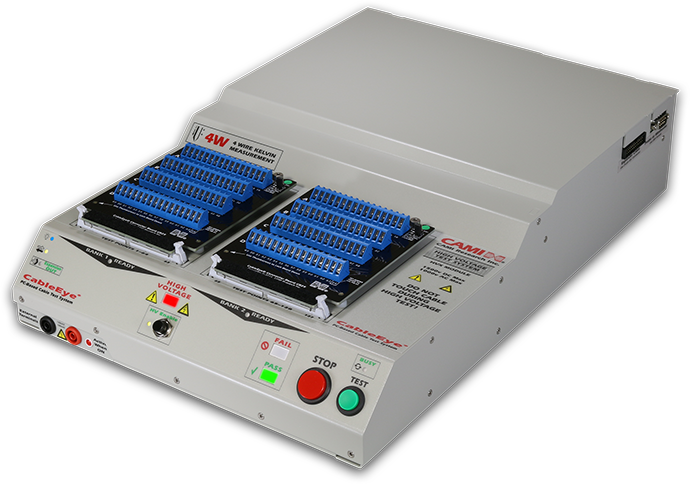
Universal power input of 100-240vAC, 60w maximum. Requires two USB channels, and Windows XP or Vista. Weight: 13 lbs (5.9 kG), Size: 12.5" wide, 18.5" deep, 3" high.

Includes one-year warranty with one year free tech support and software upgrades.

HVX Control Panel

After login, press the HV Enable button (center) to enable the system for high voltage testing. Then, either learn a cable attached to the tester, or load a previously stored cable from the database, and press the TEST button to initiate a test. Repetitive testing can be controlled entirely from this front panel without referring to the computer screen or keyboard. Large, bright Pass and Fail indicators summarize the test result. A large, red High Voltage indicator turns on when high voltage is applied to the test cable.

A fast linear hipot scan checks 13 nets per second. Full DC or AC scans permit adjustable ramp up and ramp down rates, trip current, trip delay (soak time), and test time. Group scan algorithm also available for very fast scanning.

External Terminals

Use these external terminals to perform basic safety testing on chassis, panels, transformers, or other applications requiring a single channel test. The bright red indicator you see to the right of the terminals turns on when you select the external terminals for output. When using the external terminals, the headers normally used to attach connector boards or flat cables are internally deactivated.

The external terminals may also be used to easily check the system's voltage accuracy, and for calibration without removal of the cover.

The slot in the lower left corner of the base will be the front attachment point for high voltage expansion modules that connect to the bottom of the main unit.

Rear Panel

Separate USB channels control the CableEye M3U tester and the HVX module. Both USB cables must be connected for the high voltage section to operate. The Remote socket on the HVX module supersedes the Remote socket on the M3U and provides access for a footswitch, remote test switch, single-bit relay I/O, and external signals for Pass, Fail, and Ready states, as well as 5v external power for accessories.

Software Control Screen

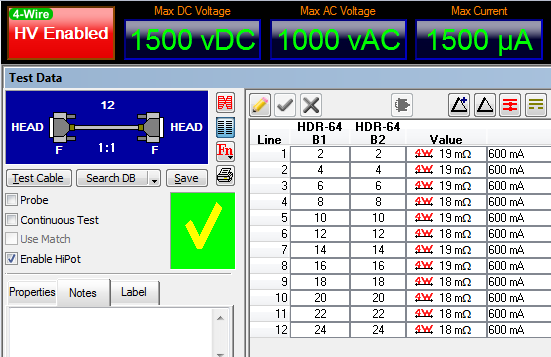
An indicator panel at the top of CableEye's control screen shows the present hipot settings. One test cycle can include any combination of a Fast DC test, Full DC Test, and AC Test. Additional columns may be turned on in the net list to show actual DC voltage, DC current, DC isolation, AC voltage, AC current, and AC isolation. You may test AC at 60 or 50 Hz.


High Voltage Test Parameters

This control screen sets the desired test types, voltages, and limits, and holds default values when you learn or enter a new cable. You may override these default values with custom values unique to that cable and stored with it in the database.

Check the test you wish to perform, and set the voltage and current limits as desired. Test voltage may be adjusted from 10v to 1500v DC in 1v increments, and 10v to 1000v AC in 1v increments.

The maximum current may be adjusted from 50µa to 1.5ma, and the isolation threshold set up to 1GΩ. Choose the lowest value possible for cable under test to minimize insulation damage in the event of dielectric failure.

The Ramp times specify how fast the test voltage is reached when starting a test and how fast the cable is discharged when the test finishes. This may be adjusted between 150v/sec to 5000v/sec. Smaller ramp rates are needed for assemblies that exhibit high capacitance.

Choose the test frequency to correspond with the power line frequency under which the cable will be operated.

Test Progress Panel

This pop-up window appears on the screen during a test to summarize which test types have been performed, which have been completed, and the progress of the test currently underway. The window disappears when the test is complete, and the final pass/fail count appears in the Test Data window.


Light Director™ System
Next Topic | Previous Topic | TOC

Item 767, CB37 Board (64-pin capacity)
Item 768, CB38 Board, (128-pin capacity)

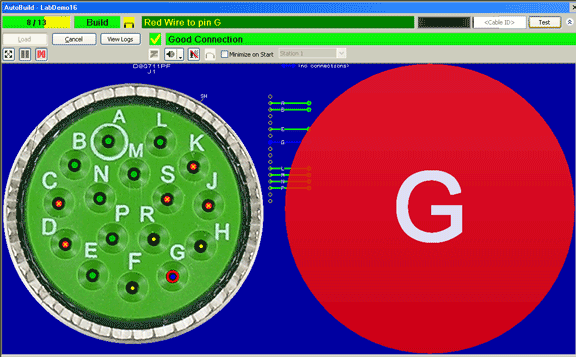
Our Light Director™ system (patented) provides a new, computer-guided technique for assembling connectors used in aerospace, medical, and other high-reliability applications. This system uses light fibers driven by super-bright LED lamps to individually illuminate target cavities in the connector being assembled. When the technician enters the wire code printed on unconnected wires, or touches a wire connected at the other end, the CableEye software turns on the appropriate fiber, thereby causing a bright, flashing light to project from inside the target cavity guiding the technician to the proper insertion point. Correct insertion is confirmed by the elimination of light from that location, whereas insertion into an incorrect location leaves the flashing light visible.

The Light Director also employs high-quality synthetic speech in English, Spanish, or French to read the pin number to the technician, further reinforcing the target location. Speech recognition is also available as an option permitting the technician to read wire codes to the system, thus eliminating the need for a keyboard or monitor.

Normally, technicians crimp pins on wires in advance of assembly to the connector. Wires may be identified during the assembly process by numeric code, bar code, color code, or if no codes are present, by electrical detection using a wrist-strap if the far end of the cable has already been assembled and can be electrically connected to the system.

Field testing has shown that the Light Director doubles assembly rate over manual methods while nearly eliminating errors. Because the Light Director greatly reduces the perceptual challenge of manually locating pin cavities in a complex connector, technician fatigue is greatly reduced, permitting a continuous, high productivity rate throughout the work day.

The Light Director™ system is an accessory for CAMI's CableEye® PC-Based cable test system. Customers purchase a mounting kit for each mating connector consisting of a CableEye plug-in board with special LED sockets, LED light fibers, fiber guide boards, a connector support board, and hardware kit. All parts are reusable. Requires the AutoBuild Guided Assembly Software (Item 728).
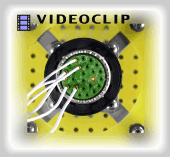
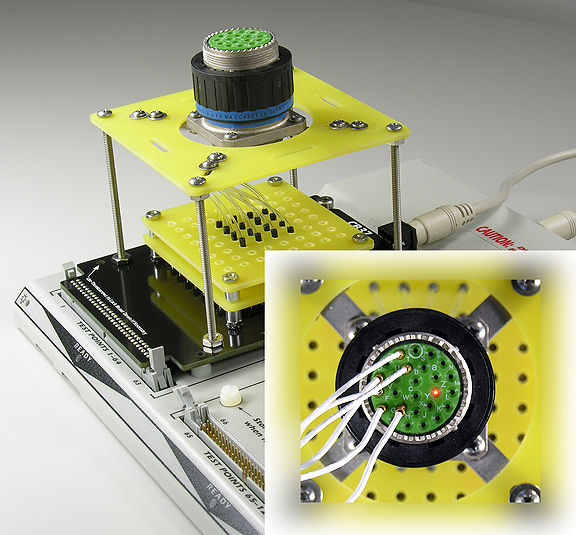
(shown with protective cover removed to reveal construction)

API Software Option
Next Topic | Previous Topic | TOC

Item 730, CableEye Applications Programming Interface (API) Software

CAMI Research’s CableEye® Cable and Wire Harness Tester normally ships with a complete software application for production, incoming inspection, and R&D. We now provide an optional "Application Programming Interface" (API), a software library that enables control of the tester by an external program. Test engineers may now write software for CableEye in Visual Basic, VB.NET, C++, C#, or from any software environment that can host our Active-X software interface.

The API provides a library of software primitives used to exercise control over all basic functions of the tester. This permits engineers to embed the tester's function within a larger system that may include electrical cable lockdown, label printing equipment, pass-fail marking devices, diverter gates, and automatic molding equipment. Engineers may even write their own fully-custom user interface for the tester for special, simplified applications like a touch-screen display.

The CableEye tester checks cables and wire harnesses for opens, shorts, and miswires, measures diode forward voltage, checks resistance values over the range of 0.3 Ω to 10 MΩ, and tests conduction and isolation resistance against specified thresholds. The API option adds $495 to the system price for a site license. Available from stock. Demo systems available for no-charge evaluation.

Visual Basic Editing Screen with Form and Code Example
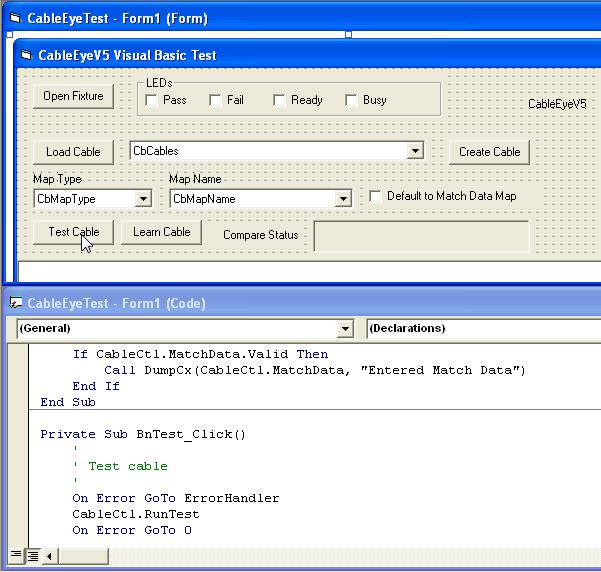
Visual Basic Editing Screen with Cable Tester API


Multi-Language Text Option
Next Topic | Previous Topic | TOC

Item 726, CableEye v5 Software Upgrade

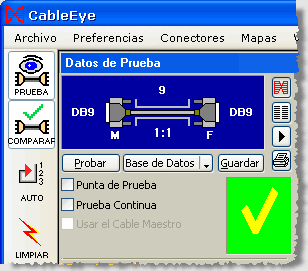
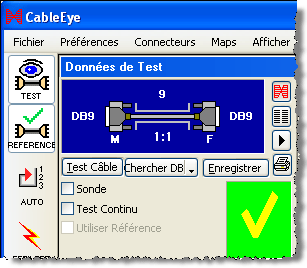
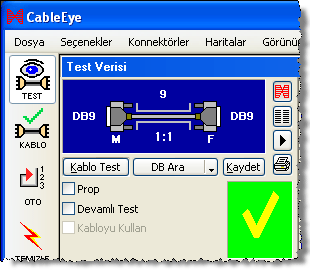
CAMI Research’s CableEye PC-Based Cable and Harness Test System now ships with multi-language capability. When the program's language preference is changed from English to Spanish, screen labels, dialog boxes, advisory screens, and error messages appear in Spanish-language text to benefit operators fluent in this language. The program may be quickly changed from one language to another at login to accommodate workers with different language preferences who share the same test station. The latest software release also includes Turkish-language text. French- and German-language text will be available in early 2008.

CableEye's built-in scripting system permits test engineers to pre-program a complex sequence of steps, further simplifying the operation for unskilled workers and ensuring a consistent process. By pressing a single button, the operator will trigger steps that test a cable, log the test result to an archive, print a report, print a label, or take conditional actions depending on a pass or fail result. The test engineer may set up optional pop-up windows that appear during the script to provide set-up instructions in the language of choice.

Basic CableEye® test systems start at $1295 for 128 test points and may be expanded to over 2000 points. The price includes software and free tech support. CableEye's software runs on Windows 2000, XP, or Vista computers. Software upgrades are available at no charge to CableEye owners with active warranties, or may be purchased for $295 by customers with older equipment. Demo systems available for no-charge evaluation.

Multi-Language Screen Text

English

Spanish
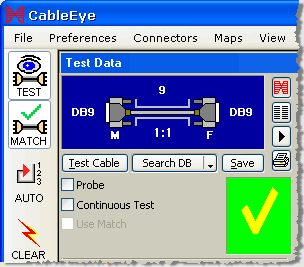
Cable Tester Screen with English Labels Cable Tester Screen with Spanish Labels

French

Turkish

512-Point CableEye System for Wire Harness Assembly and Test

CableEye Cable Tester and Harness Tester


Speech-Directed Guided Assembly Software
Next Topic | Previous Topic | TOC

Item 728V, AutoBuild Software with Voice Direction

CAMI Research’s enhanced AutoBuild™ software provides guided assembly with speech for cable and wire harness manufacturing. During construction, the technician touches an unterminated wire using either a probe, or a finger with wriststrap, and the software reads the intended connection point using high-quality synthetic speech. The software also shows a connector graphic with the target pin highlighted. Once the connection is made, audible feedback confirms a proper connection or warns of an error.

Synthetic speech increases throughput, and helps the technician avoid repetitive motion injury to the neck and shoulders by eliminating the need to look constantly between the workpiece and the videoscreen. A simple half-open headset permits the speech to be easily heard in a noisy environment without interfering with other workers.

As the operator attaches each new wire, AutoBuild tests the entire assembly and provides a clear checklist showing all completed good connections. When finished, a printed report shows construction time and operator performance. By combining guided assembly, test, and report generation, harness manufacturers may achieve higher levels of productivity than previously possible.

Designed to work with CAMI’s CableEye tester, AutoBuild lets the operator place diodes and resistors by name and value, check resistance values over the range of 0.3 Ω to 10 MΩ, and test conduction and isolation resistance against specified thresholds. The CableEye® Model M3U Cable Tester sells for $2195 for 152 test points, is expandable to over 2000 points. Includes software and free tech support. The AutoBuild option adds $395 to the system price and can be provided with English, Spanish, French, or German speech modules.

Touch-Sensitive Wires (wrist-strap not visible)
JPEG Image of Connector Appears on the Screen with Pin Highlighted

Harness Tester Guided Assembly


512-Point CableEye System for Wire Harness Assembly and Test

Harness Tester with 512 Test Points


CableEye's Next Generation Version 5 Software
Next Topic | Previous Topic | TOC

Item 726, Software Upgrade

Under development for over four years, we are pleased to introduce CableEye's new Version 5 software with many new capabilities not previously available, including:

  • Multiple independent connector graphics with individual view direction controls for multi-headed cables and wire harnesses.
  • Assignment of color codes to wires (base color with up to three stripes) shown graphically or as text.
  • Description field for each wire allowing you to enter a signal name, wire gauge, terminal type, or other pertinent information.
  • Individual resistance tolerance for every resistor or wire (M3 testers only)
  • Measurement of diode voltage drop and reverse resistance up to 10 MΩ (M3 testers only).
  • Editing of the wiring in graphic mode as well as in netlist mode (you may create new connection by dragging a wire from pin to pin with a rubber-banding tool).
  • Probe function with memory allowing you to see and record connections to bare wires you touch with the probe.
  • Hover over components in the wiring graphic to see component values, pin numbers, and connector names.
  • PinMap is now integrated with the main application, redesigned, and much easier to use.
  • Many more features...

If you have an active warranty, you may obtain the Version 5 software at no charge by contacting us to obtain an installer CD. Customers whose warranties are not active may order the new software, Item 726B, at $295.

Example Wire Harness Graphic Display

CableEye Cable Tester Wiring Display


Example Wire Harness Netlist Display

CableEye Cable Tester Netlist Display


Loading a Cable from the Database

Note that cables may now be grouped by Database and Type, simplifying the selection of cable data. You may create types of your own choosing which would, for example, let you show cables in the list by customer, application, product, or part number. Check only the type of interest when loading a cable to display only that group. Type in a Name or Description to further limit the length of the list. These features help in managing very large cable databases.

Loading a Model Cable from the Cable Database


Transition System for Wire Harness Assembly Boards
Next Topic | Previous Topic | TOC

Item 759A, CB29A Connector Board Set

This variation of the CB29 board serves as a transition board between wire harness mating connectors and the CableEye tester. Mount the CB29A on or under a harness board, terminate the mating connectors to screw terminals on this board, and connect the 64-pin right-angle headers to CableEye using 64-conductor flat cable (see Item 854). Stackable, as shown in the photo. Includes kit of screws and standoffs. Set of two boards.

Screw Terminal Board for CableEye Harness Tester

Three CB29A Boards shown Stacked.


New Connector Board for High Pin Count Custom Interfaces
Next Topic | Previous Topic | TOC

Item 760, CB30 Connector Board Set

This generic board, similar in design to the CB8, accepts a wide range of circular connectors, rectangular connectors, bracket-mounted assemblies, and adapter cables. The customer mounts the connectors of interest using supplied standoffs and screws. Any panel-mount circular connector with four mounting holes fits the "X" pattern slots on this board. Mount up to four small circular connectors (mounting hole spacing less than 0.9"), or one large connector (mounting hole spacing less than 2.3"). Holes may be drilled in the board to accommodate other mounting arrangements. Wire pins from the attached connector to labeled pads surrounding the board. Use the numerous small holes around the board for nylon lacing to hold wiring in place. Alternatively, mount dual-row headers of up to 64-pins to the right and left pad footprints, spaced on a 0.1" grid (see 2nd photo, right). Use these headers for a custom-designed daughter board that plugs into the CB30 (see the CB30A board below) or for flat cables. Instead of a single 64-pin header, attach combinations of smaller headers that have a 0.1x0.1" footprint. A total of up to 128 pins can be accommodated per board.

When the wiring is displayed, a generic dual-row header is shown for the connector. Use the optional PinMap software (Item 708, recommended for this board) to choose a different graphic from the CableEye connector library and assign custom pin labels. Use two CB30 boards together, or a CB30 in combination with any other CB board to accept any connector combination. Review the photos below for the setup options, or click to see photos of custom CB30 applications. Set of two boards with expander cables. Requires 256 test points.

Custom Interface Board for CableEye Harness Tester


Connecting the CB30 to a 256 TP CableEye System

Connecting the CB30 Interface Board to the Cable Tester


CB30 Application showing a Complex Adapter Cable Interface

Adapter Cable Interface Built  on CB30 Interface Board


New Connector Board for for Mictor Connectors
Next Topic | Previous Topic | TOC

Item 760A, CB30A Connector Board Set

This board supports 38-, 76-, and 114-pin surface-mount AMP Mictor connectors. A secondary bank in the lower part of the board provides backup footprints in the event that any of the connectors in the primary bank should become damaged or suffer intermittent connections from wearout. Pad spacing on this board is 0.025" (0.64mm), and the pads are arranged in groups of 38 (19 on each side). These boards ship without Mictor connectors. CAMI Research will solder in connectors provided by the customer if desired, in which case a set of test cables should also be supplied so that we may test the interface before returning it to the customer.

Important: These CB30A boards are daughter boards intended to mount on a set of CB30s (see 2nd photo). Plan on ordering a set of CB30s with the CB30A if you do not already have them.

Set of two boards with four 64-pin latch headers. Requires 256 test points and a set of CB30 boards. Note that the latch headers should be mounted to the CB30 boards to accommodate the 64-pin sockets on the bottom of the CB30A; CAMI Research will configure this for you if the CB30s are ordered at the same time as the CB30A.

Link to Connector Manufacturer Web Site: AMP/Tyco Mictor Connectors

CB30A Plugboard for the CB30 Custom Interface Board

Test Board for Mictor Connectors


Connecting the CB30A to the CB30

CB30A Daughter Board Mounted on CB30


New Connector Board for Metral Connectors
Next Topic | Previous Topic | TOC

Item 761, CB31 Connector Board Set

We designed the CB31 for Metral connectors (manufactured by FCI) which have 4x24 and 5x6 pin layouts on a 2mm grid. This board comes without connectors installed. Users should provide and may easily solder in connectors of the needed size. When using 4x24 (96-pin) and 5x6 (30-pin) connectors with the Auto-ID jumper in place as shown in the 2nd photo, the CableEye software automatically assigns the pin numbers as defined by the manufacturer for connectors of these sizes. For smaller connectors, use the optional PinMap software (Item 708) to select an appropriate graphic and assign pin labels. CAMI Research will solder in connectors provided by the customer if desired, in which case a set of test cables should also be supplied so that we may test the interface before returning it to the customer. Set of two boards with expander cables. Requires 256 test points.

Link to Connector Manufacturer Web Site: http://www.fciconnect.com/electrical-connector/metral.htm

CB31 Board Shown as Shipped (without connectors)

Interface Board for Metral Connectors


CB31 Shown with 96-pin and 30-pin Connectors Mounted

Metral Connectors Mounted to CableEye Test Board


New Connector Board for DB104 High-Density Connectors
Next Topic | Previous Topic | TOC

Item 762, CB32 Connector Board Set

Use CB32 for DB104 male or female connectors. This board comes without connectors installed. Users should supply and may easily solder in one vertical male or female connector on each board, as needed. CAMI Research will solder in connectors provided by the customer if desired, in which case a set of test cables should also be provided so that we may test the interface before returning it to the customer. Set of two boards with expander cables. Requires 256 test points!

DB104 connectors may be obtained from Positronic Industries: http://www.connectpositronic.com/D-Subminiature/


CB32 Board Shown as Shipped (without connectors)

DB104 Test Board for CableEye Cable Tester


CB32 Shown with a DB104 HD Male Connector Mounted

DB104 Mounted to Test Board


New Connector Board for Molex MiniFit, MiniFit Sr., and MicroFit Connectors
Next Topic | Previous Topic | TOC

Item 763, CB33 Connector Board Set

This board includes connector footprints for MiniFit connectors with 0.118", 0.165", and 0.394" pin centers. The footprint patterns were sized so that the largest connector in the family will fit. Because of the wide variety of connectors available for this board and the many possible customer configurations, the board is sold without any connectors. Customers should obtain their own mating connectors suitable for their application. CAMI Research will solder in connectors provided by the customer if desired, in which case a set of test cables should also be provided so that we may test the interface before returning it to the customer. Connector graphics are automatically size to fit the measured wiring. Set of two boards.

When ordering connectors, choose post length suitable for a 0.093" thick PCB. This is the board thickness of all CAMI CB boards.

CB33 Board Shown as Shipped (without connectors)

Molex Min-Fit and Micro-Fit Test Board


New Connector Boards for HDMA and InfiniBand Connectors
Next Topic | Previous Topic | TOC

Item 756, CB26 Small Frame Motherboard

CB26 provides the support frame component of our two-board system of mounting connectors available only in right angle format. This board provides two 68-pin 2mm headers designed to mate with any of the CB26A, CB26B, CB26D, and CB26C plugboards (sold separately). Up to two plugboards may be attached simultaneously and are held in place with right-angle brackets. Each plugboard houses the right angle connectors. Set of two boards.


Item 756E, CB26E Plugboard for HDMI (High Density Multimedia Interface) Connectors

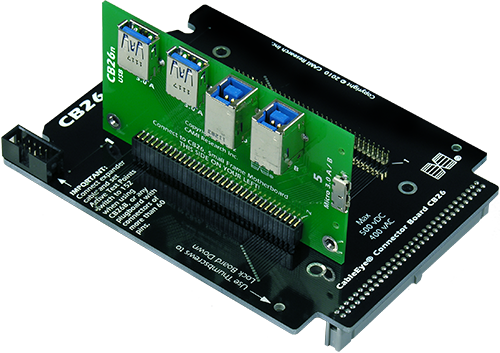
CB26E offers two independent HDMI connectors (19 pins plus shield). These connectors may be used simultaneously for multi-headed cables. Requires the CB26 Small Frame Motherboard (Item 756) for operation. Set of two boards.

Photo shows CB26 (black) with the CB26E (green) plugged into the first slot. The second slot is available for another plugboard. See close-up of connectors above.


Item 756F, CB26F Plugboard for InfiniBand Connectors

CB26F accepts the InfiniBand connector (25 pins plus shield). Two independent connectors are provided and may be used simultaneously for multi-headed cables. Requires the CB26 Small Frame Motherboard (Item 756) for operation. Set of two boards.

Photo shows CB26 (black) with the CB26F (green) plugged into the first slot. The second slot is available for another plugboard. See close-up of connectors below right.


CB26 Plugboards Released Previously (not pictured here):

Item 756A, CB26A Plugboard for 26-pin Smart Serial Connectors

Item 756B, CB26B Plugboard for 50- and 68-pin VHDCI Connectors

Item 756C, CB26C Plugboard for 4-, 6-, 8-, and 10-pin Modular Plugs

Item 756D, CB26D Plugboard for IEEE 1394B, USB MiniB, and Serial ATA Connectors

HDMI Connector Test Board for Cable Tester
CB26E HDMI Connectors (top view)
68-pin (left), 50-pin

HDMI Test Board Mounted

CB26E Mounted on CB26 Small Frame Motherboard


InfiniBand Test Board for CableEye
CB26F Connectors (top view)
InfiniBand Connectors

InfiniBand Board Mounted
CB26F Mounted on CB26 Small Frame Motherboard


New Carrying Case for CB Boards
(last topic) | Previous Topic | TOC

Item 704B, Carrying Case for CB Boards

This rugged, polyethylene case weighs about 6 lbs empty, is resistant to moisture, oils, and solvents, and includes a foam-lined compartment. The mechanical hinges and latches are designed for long-term durability and will safely transport CableEye connector boards and other accessories. This case can store between 10 and 20 CB boards in the 20-slot rack, depending on the size of the connectors. Additional room in the front of the rack is wide enough for additional CB board packed in their original bubble bags, and other accessories. The outside dimensions of this case are 18.5" long, 14" wide, and 7" deep.

1 – Case Open Without Boards Installed

Carrying Case for Cable Tester Plug-in Boards


2 – Between ten and twenty boards will fit in the rack,
depending on the connector sizes.

Carrying Case with 14 Connector Boards


3 – Ready to travel! A small hasp near the handle
will accept a padlock or bungee cord.

Carrying Case Ready to Travel


See "CableEye's Unique Benefits" for an illustrated presentation of the CableEye's complete software package.

Get your free literature package, including a 8-page color brochure, product catalog with prices, sample laser printer output, and Applications Guide.
Top of Page

Home | Contact | Wiring Analyzer & Testing Products | Catalog | Software Videoclips | Prices | Support